The UI for working with agents
Streamed agent chat with approvals and questions, knowledge-graph maps, agent presence, and edits an agent proposes and a person accepts. Every surface is controlled by your app, and every decision stays with a person.
AgentThread and AgentComposer over the fancy-chat-js thread log. The opening turn is a recording; decide the approval, tap a suggestion or send a message. No model runs here: every reply is the same canned one, and it says so.
This kit's own dependency map: every package is a node, and every runtime, peer or dev dependency between two of them, read from what each one last published, is a link. Clustered on a 2D canvas, then as a cosmos in 3D on fancy-3d-three. Type the nodes by group or language and filter the links by kind; click a node to see the package and open its page. The overlay in the corner switches layers, and in 3D the cosmos's orbits.
An agent's edit as fancy-diff hunks you accept or reject one by one, beside agent-integrations' AgentPanel showing what the agent did. Only accepted hunks land.
Subagents
Headless agent packages: they run on the server and have no UI of their own, so there is no live demo. Each one names the UI it works with, and shows what it has built in our lab where there is a capture.
particle-academy/charlotte
PHP · headlessCharlotte: a headless website-builder agent kit for Laravel on prism-harness and fancy-cms. Agents edit DRAFTS (nothing publishes on a change), autonomy is your setting (full, or approve on save), invented and missing facts are caught in code, and an ordered event log long-polls behind any proxy, so you can build your own chat. Any Prism provider; cost telemetry optional. Pre-1.0.
Real pages particle-academy/charlotte built in our lab: the highest-scoring builds by the newest models. None has passed the reviewer's professional-grade bar yet, and each caption gives the reviewer's own verdict.
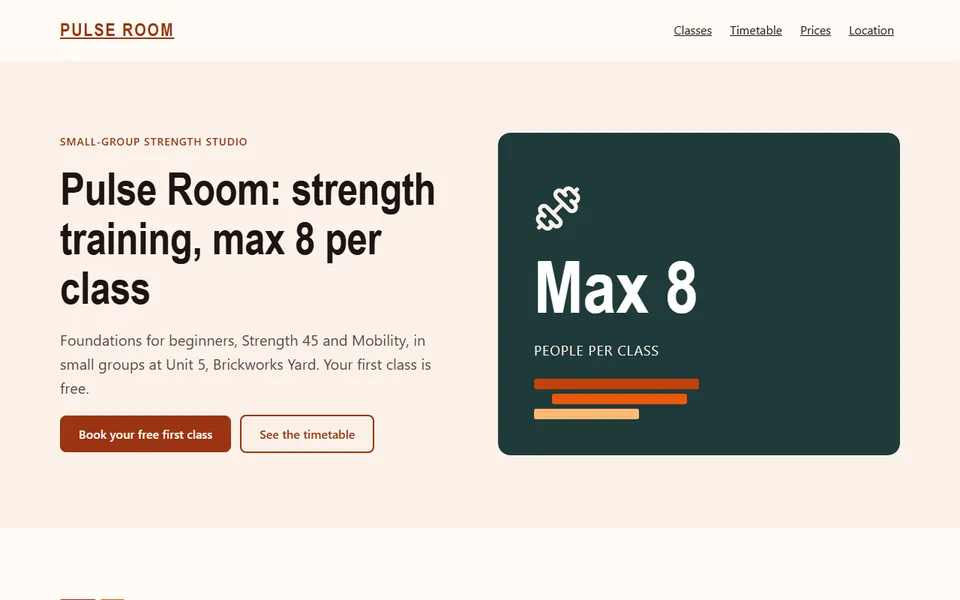
Claude Opus 5.5 · 2026-11-15
Structural checks passed. The reviewer scored it 84.6 of 100 and did not pass it as professional-grade: it flagged a generic, decorative hero block and a thin location section.
Whole page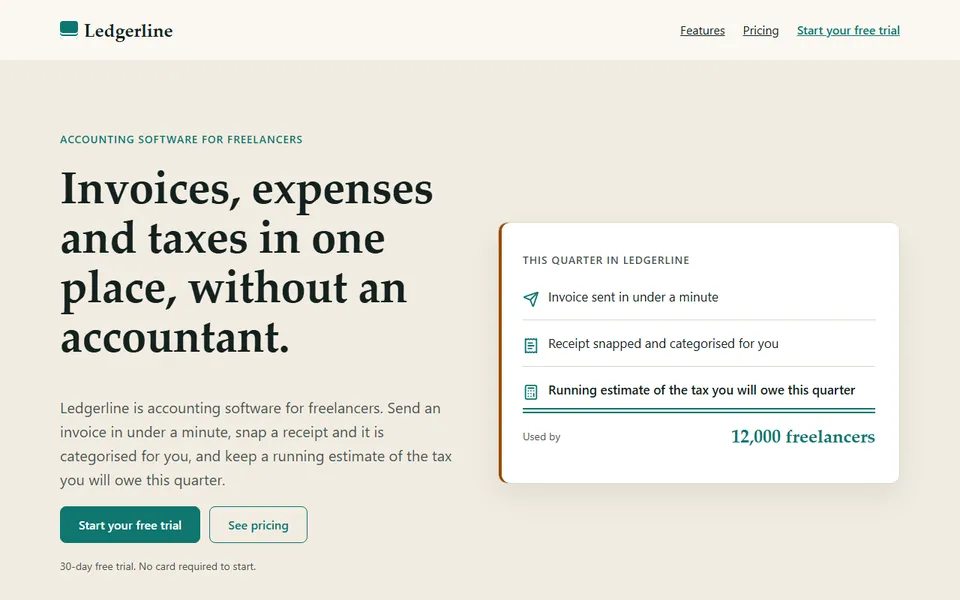
Claude Opus 5.5 · 2026-11-13
Structural checks passed. The reviewer scored it 83.6 of 100 and did not pass it as professional-grade: it flagged an unbalanced two-card pricing row at desktop and a cramped mobile nav.
Whole page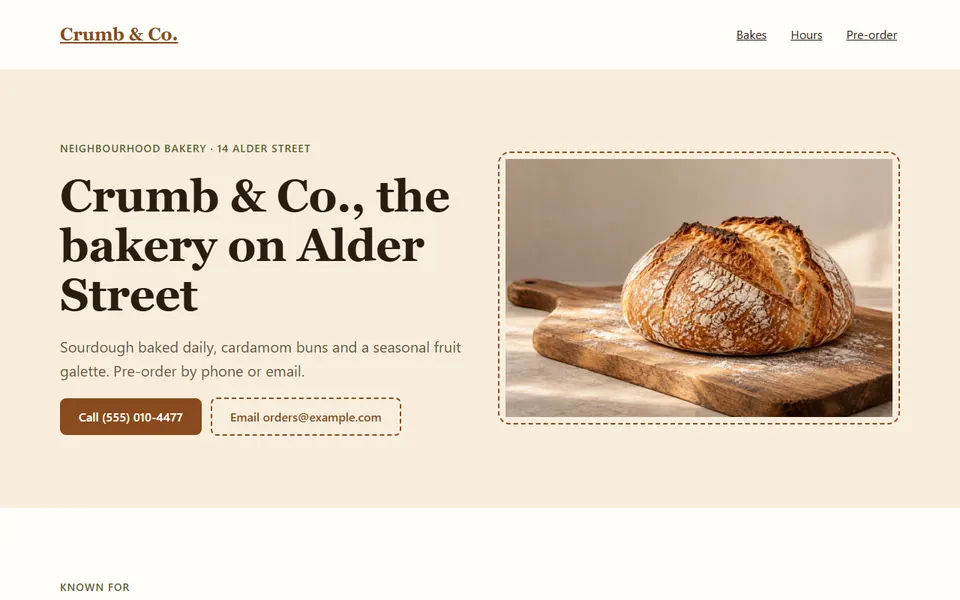
Claude Fable 5.2 · 2026-11-13
Structural checks passed. The reviewer scored it 82.9 of 100 and did not pass it as professional-grade: it flagged filler copy on the product cards and dashed borders repeated until they read as a template.
Whole page
Claude Fable 5.2 · 2026-11-13
Structural checks passed. The reviewer scored it 82.8 of 100 and did not pass it as professional-grade: it flagged the required legal disclaimer as too small to notice, in the footer only.
Whole page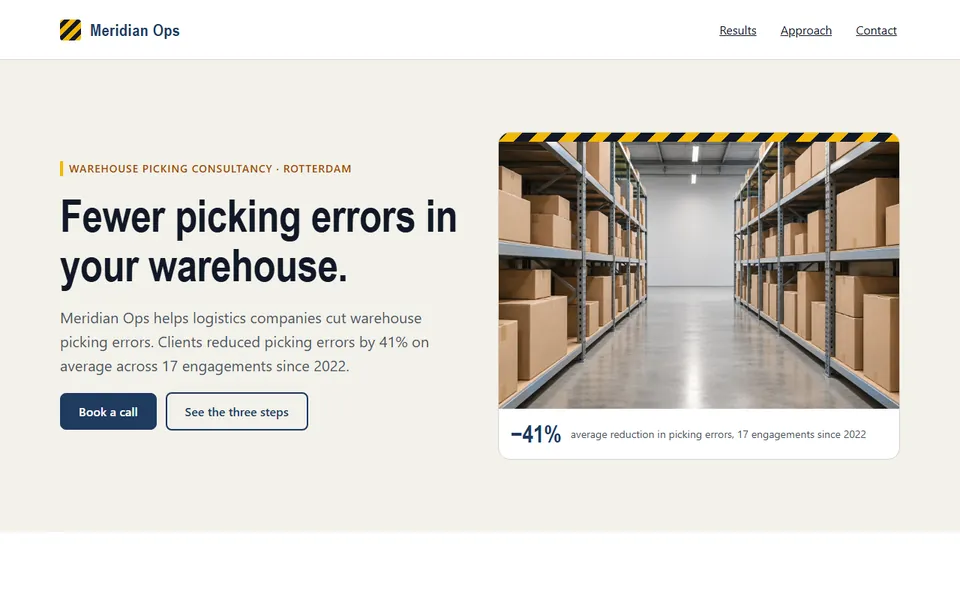
Claude Opus 5.5 · 2026-11-15
Structural checks passed. The reviewer scored it 82.3 of 100 and did not pass it as professional-grade: it flagged the 41% figure repeated four times and step cards that only restate their headings.
Whole pageteachers-aid
PHP · headlessThe TAC authoring agent: reads course material and PROPOSES curriculum, course and test changes. Propose-then-apply is structural — the tools hold no repository or connection, so there is no code path from a tool call to a write, and a prompt injection inside an uploaded handbook still cannot change anything. LLM-library agnostic behind one ChatDriver seam.
No showcase output yet: the lab has no capture of this agent's work.
What it does
Chat that survives a reload
useAgentThread reads an append-only thread log with a gapless seq over SSE, falling back to long-poll, and replays from where it left off. AgentThread renders thinking, tool calls, plans and messages; AgentComposer keeps a draft per thread.
Decisions stay with a person
ApprovalCard and QuestionForm send a decision without an actor; the server resolves who decided. The agent-chat bridge has no decide, answer or send tool, so a co-driving agent cannot approve its own request.
Maps of what an agent knows
fancy-graph draws knowledge graphs of plain JSON nodes and links in 2D or 3D, with controlled selection, focus, search and camera, so an app can point at what an agent is talking about.
Proposals, not writes
fancy-diff turns an agent's edit into hunks a person accepts or rejects, with a controlled acceptance map. agent-integrations adds presence: an agent's cursor, its activity panel and per-agent undo.
Across screens
fancy-screens registers each screen of a multi-screen app and carries an agent's activity across them, so presence shows on whichever screen the agent is working in.
How it fits
The chat UI speaks the fancy-chat-js contract; fancy-chat-php serves it on Prism Harness. The cowork backends (fancy-cowork, fancy-cowork-js) are headless, and their browser side ships in agent-integrations.
Human+ bridge
An agent drives this surface over MCP, through the same state a person sees, never the DOM.
import { registerAgentChatBridge } from "@particle-academy/agent-integrations/bridges/agent-chat";tools: chat_* / hitl_list / knowledge_searchimport { registerScreensBridge } from "@particle-academy/agent-integrations/bridges/screens";tools: screens_*
Install
Install only the surfaces you use; each one stands alone.
npm install @particle-academy/fancy-chat-uinpm install @particle-academy/fancy-graphnpm install @particle-academy/agent-integrationsnpm install @particle-academy/fancy-diffnpm install @particle-academy/fancy-screensnpm install @particle-academy/teachers-aid-ui
The packages
React agent chat surfaces on Prism, built from react-fancy: useAgentThread (resumable SSE with a long-poll fallback over the fancy-chat-js thread log), AgentThread, AgentComposer with attachments, activity rows, and the human-in-the-loop set (ApprovalCard, QuestionForm). Controlled, with stable data-fancy-chat-* handles; decisions stay with the human. Optional charts on fancy-echarts and a knowledge explorer on prism-graph. Pairs with particle-academy/fancy-chat-php.
Knowledge-graph map viewer: a controlled <GraphView> over plain JSON nodes and links, with pluggable layout, physics and rendering, ready-made view presets, light, dark or custom themes, controlled layer visibility and an opt-in controls overlay on react-fancy (/controls). 2D canvas in the core; 3D on the /three subpath through fancy-3d-three.
MCP-driven agent presence — micro-MCP server, bridges, presence layer, share relay.
Human+ side-by-side document diff with hunk acceptance — a client-side, zero-dep diff engine or a git unified-diff datasource.
Multi-screen application shell with cross-screen agent presence.
The React surface for the TAC authoring agent — chat transcript, a composer with file drop for handbooks and decks, and the plan-review approval surface where a human turns a proposal into a change. Transport-agnostic: no router, no HTTP client.
Put an agent in your interface
Each package page runs its components live; the Human+ feature covers the bridges agents drive them through.